ROS 构建功能包

前言

这里以一个例子来阐述下怎么搭建功能包的过程, 在整个构建的过程莫过于CMakeLists编写内容所代表含义那块有点不理解,多看几遍书和其他人写的博客也就慢慢的理解了;

创建功能包

创建ROS功能包的命令如下:

catkin_create_pkg [功能包名称] [依赖功能包1] [依赖功能包n]

“catkin_create_pkg”命令在创建用户功能包时会生成catkin 构建系统所需的CMakeLists.txt和package.xml文件的包目录, 这部分专门做了记录,这里不再赘述。输入命令行移动到工作的目录:

cd ~/catkin_ws/src

和书籍[1]里面保持一致,使用以下命令创建一个名为my_first_ros_pkg的功能包:

catkin_create_pkg my_first_ros_pkg std_msgs roscpp

上面用“std_msgs”和“roscpp”作为前面命令格式中的依赖功能包的选项。这意味着为了使用ROS的标准消息包std_msgs和客户端库roscpp(为了在ROS中使用C/C++),在创建功能包之前先进行这些选项安装。这些相关的功能包的设置可以在创建功能包时指定,也可以在创建之后直接在package.xml中输入。

如果已经创建了功能包,“~/catkin_ws/src”会创建“my_first_ros_pkg”功能包目录、ROS功能包应有的内部目录以及CMakeLists.txt和package.xml文件。可通过如下指令去查看此目录下的文件内容:

ls my_first_ros_pkg

修改构建配置文件CMakeLists:

cmake_minimum_required(VERSION 2.8.3)
project(my_first_ros_pkg)
find_package(catkin REQUIRED COMPONENTS roscpp std_msgs)
catkin_package(CATKIN_DEPENDS roscpp std_msgs)
include_directories(${catkin_INCLUDE_DIRS})
add_executable(hello_world_node src/hello_world_node.cpp)
target_link_libraries(hello_world_node ${catkin_LIBRARIES})

编写源代码

在上述CMakelists.txt文件的可执行文件创建部分(add_executable)中,进行了以下设置:

add_executable(hello_world_node src/hello_world_node.cpp)

换句话说,是引用功能包的src目录中的hello_world_node.cpp源代码来生成hello_world_node可执行文件。由于这里没有hello_world_node.cpp源代码,需要进行编写,
首先,用cd命令转到功能包目录中包含源代码的目录(src),并创建hello_world_node.cpp文件

cd ~/catkin_ws/src/my_first_ros_pkg/src/
touch hello_world_node.cpp

之后如下修改代码:

#include <ros/ros.h>
#include <std_msgs/String.h>
#include <sstream>
int main(int argc, char **argv)
{
ros::init(argc, argv, "hello_world_node");
ros::NodeHandle nh;
ros::Publisher chatter_pub = nh.advertise<std_msgs::String>("say_hello_world", 1000);
ros::Rate loop_rate(10);
int count = 0;
while (ros::ok())
{
std_msgs::String msg;
std::stringstream ss;
ss << "hello world!" << count;
msg.data = ss.str();
ROS_INFO("%s", msg.data.c_str());
chatter_pub.publish(msg);
ros::spinOnce();
loop_rate.sleep();
++count;
}
return 0;
}

构建功能包

所有构建功能包的准备工作都已完成。在构建之前,使用以下命令更新ROS功能包的配置文件。这是一个将之前创建的功能包反映在ROS功能包列表的命令,这并不是必选操作,但在创建新功能包后更新的话使用时会比较方便。

rospack profile

之后进行catkin构建。移动到catkin工作目录后进行catkin构建

cd ~/catkin_ws && catkin_make

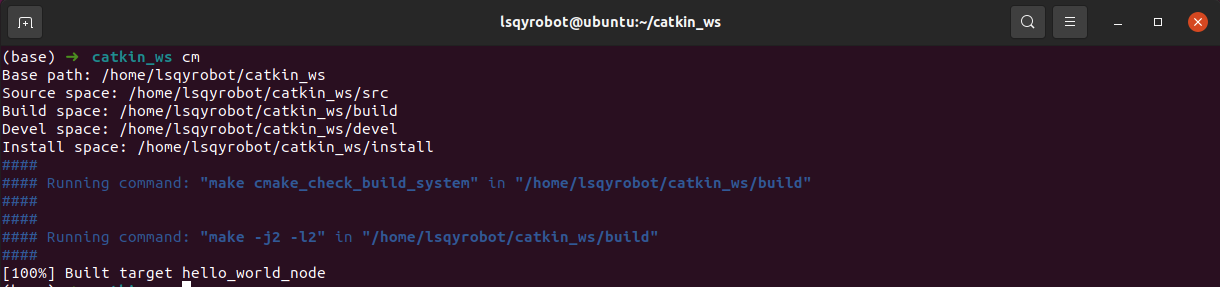
构建成功后,可参考下图所示

运行节点

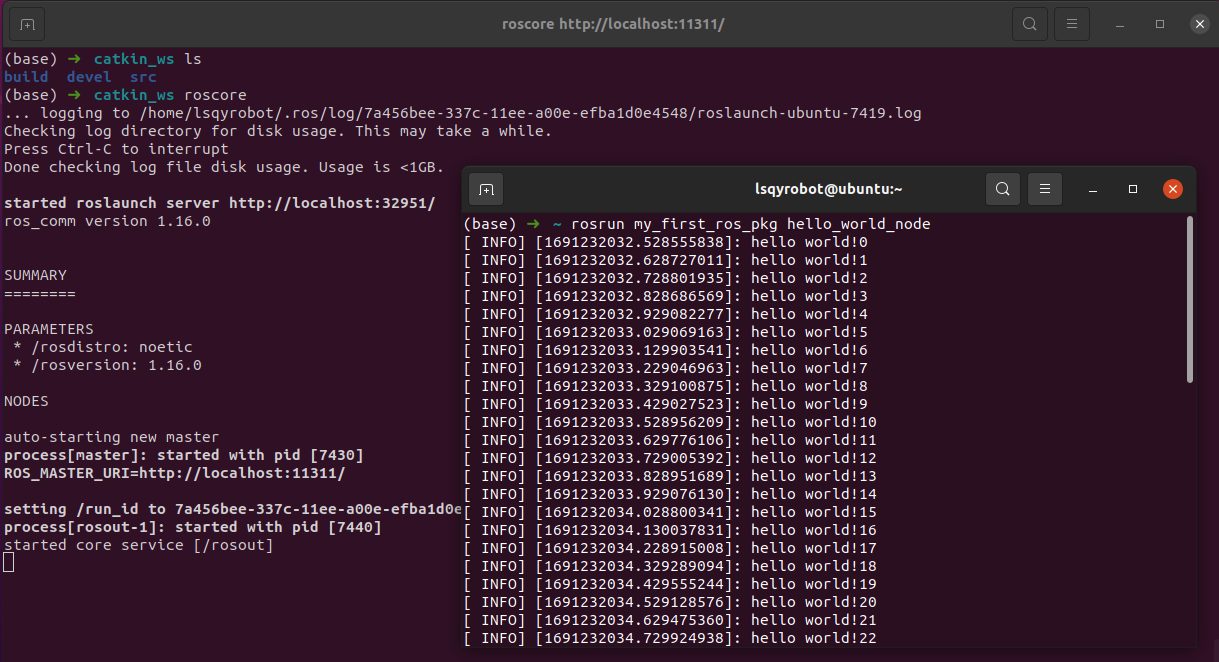
如果构建无误,那么将在“~/catkin_ws/devel/lib/my_first_ros_pkg”中生成“hello_world_node”文件。 下一步是运行该节点,打开一个终端窗口(Ctrl + Alt + t)并在运行该节点之前先运行roscore。请注意,运行roscore后,ROS中的所有节点都可用,除非退出了roscore,否则只需运行一次。

roscore

最后,打开一个新的终端窗口(Ctrl + Alt + t)并使用以下命令运行节点。这是在名为my_first_ros_pkg的功能包中运行名为hello_world_node的节点的命令。

rosrun my_first_ros_pkg hello_world_node

运行效果如图所示

参考

[1]. 《ROS机器人编程–从基本概念到机器人应用程序编程实战》

3d打印 actor-critic adaptive sampling ai辅助设计 algorithm algorithms anymal apriltag ardupilot async atlas attention automation axis-angle bang-bang belief encoder bitbake blender bode bsp c++ cadquery calibration camera calibration camera-intrinsics cargo chrome cmake cmakelists cnn colcon computer-vision conan control controller_manager cpp cpu d435i dagger data_struct db depth camera depth-camera design-pattern diagnostics direct collocation dots dtof economics eigen elevation map elf embedded linux executor factory-pattern fcpx ffi fiducial marker figure finance forge fourier fov freecad gae gazebo gdb geometry git gnu gru guitar hardware humanoid ibus imu interest isaac gym isaac lab isaaclab kdl laplace latent variable latex launch learning-notes legged locomotion legged robotics legged-robot legged_gym life linux linux-kernel linux-tools mac math matlab matrix memory mixture of experts mlp money motion imitation motion-control motor moveit mpc mujoco music-theory network neural mapping ocs2 ode onnx openscad operator optimal algorithm optimal-control perceptive locomotion perf performance personal-finance piano pinhole-camera pinocchio pixhawk pixhawk 6c point-cloud policy distillation ppo privileged learning profiling px4 python qgroundcontrol qos quadrotor qualcomm realsense reinforcement learning representation learning reward tuning rnn robogauge robot robot parkour robotics ros ros2 ros2_control rsl_rl rtb rust security sensor-fusion shell signal-processing sim-to-real simulation socket soft dynamics constraints spot ssh stairs stl stm32 systems-programming tcp-ip teacher policy teacher student teacher-student temporal convolution terrain reconstruction thread tools tron1 twist ubuntu uml uncertainty unitree unitree g1 urdf vae valgrind vcxsrv velocity vim web wifi wiring work workflow wsl yocto z-transform zero-shot transfer 中文输入 交叉编译 人形机器人
知识共享许可协议